
AdvancedPing – A Smarter, Real‑Time Approach to Network Connectivity Monitoring
In modern always‑connected environments, knowing whether your network is healthy isn’t optional – it’s essential. Whether you’re supporting infrastructure, diagnosing intermittent issues, or tracking uptime across multiple systems, you need more than a basic ping tool.
AdvancedPing was built for exactly that.
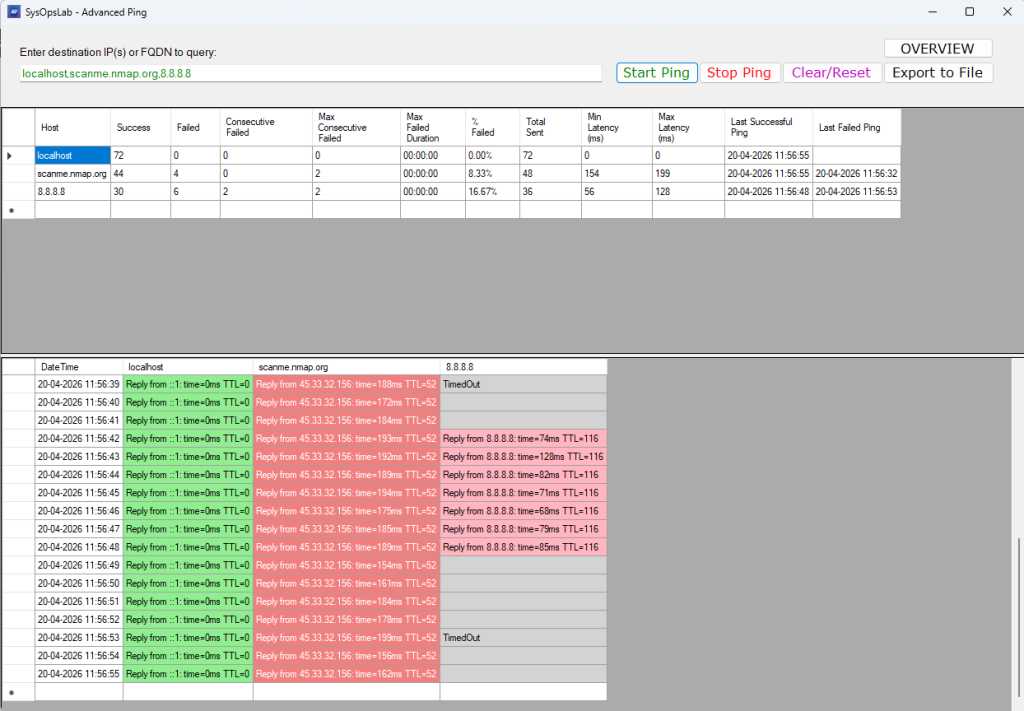
AdvancedPing is a Windows-based monitoring tool designed to go far beyond the traditional “send a ping and hope for the best” workflow. Instead of one‑off checks, it provides continuous, real‑time visibility into the availability and performance of multiple hosts at once.
You can enter any combination of IP addresses or domain names, and the application validates each entry before monitoring begins. Once active, AdvancedPing sends asynchronous ping requests every second, keeping the UI responsive while efficiently handling multiple targets in parallel.
Real‑Time Monitoring With Meaningful Insights
Where most ping tools stop at “reply” or “timeout,” AdvancedPing keeps going. Its built‑in analytics engine tracks:
- Success and failure rates
- Latency ranges and averages
- Consecutive failures and recovery streaks
- Intermittent or pattern‑based outages
This transforms raw ICMP replies into actionable information. Instead of guessing whether a device is “flaky,” you can see the trend.
Smarter Resource Handling With Exponential Backoff
Continuous monitoring shouldn’t mean unnecessary network noise.
AdvancedPing uses an exponential backoff strategy to reduce retry frequency when a host repeatedly fails. This prevents:
- Excessive ICMP traffic
- Unnecessary load on remote devices
- False positives caused by aggressive retry loops
The result is a monitoring tool that’s both responsive and respectful of network conditions.
A Clean, Visual Interface Built for Clarity
The interface is designed to surface the most important information at a glance:
- A structured table of results
- Color‑coded indicators for slow responses, failures, and inactive hosts
- Real‑time updates without UI freezing
- Export to CSV for reporting or long‑term analysis
Whether you’re watching a single server or dozens of endpoints, the layout stays readable and efficient.
Exportable Data for Reporting and Diagnostics
All collected metrics can be exported to CSV, making it easy to:
- Build uptime reports
- Share diagnostics with colleagues
- Feed data into external tools or dashboards
This turns AdvancedPing into both a live monitoring tool and a lightweight reporting engine.
Important Disclaimer
AdvancedPing is a diagnostic tool, but like any network utility, it must be used responsibly.
- Frequent or continuous pinging can generate noticeable traffic, especially when monitoring many hosts.
- Some firewalls, IDS/IPS systems, or network appliances may interpret repeated ICMP requests as suspicious.
- Monitoring or probing networks without authorization may violate organizational policies or legal requirements.
Always ensure you have permission to monitor any device or network.
Download here